We do not want to build another chat. Daily work often needs more finesse than a back-and-forth conversation.
We do not aim to replace people. Neither do we think this is possible for every task without sacrificing quality. Automating some tasks may be possible, but the key question is: How do we get there?
More features do not always mean more value. More AI does not always mean faster and better outcomes.
This is why we’re building Riskflow Cases. A calm workspace for your team. We want to empower daily work and allow a safe transition to meaningful automation.
THE DESK APPROACH
Understand. Shape. Move forward.
Three principles. One way of working — from the first question to a clear next step.
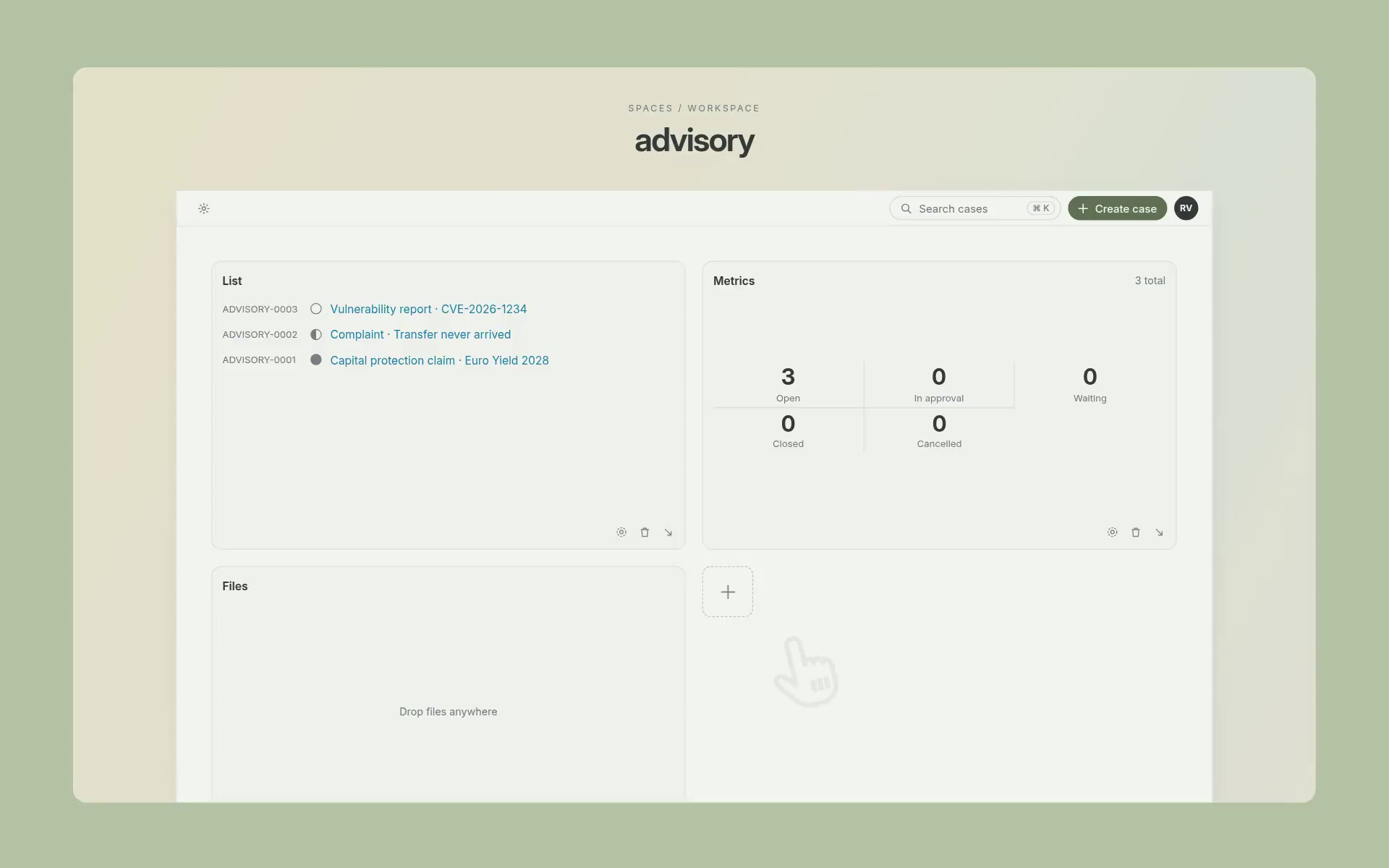
Start where the work already happens. Bring an email, a task, or a document into Riskflow Cases. Each inquiry becomes a case in your dashboard.
See what needs your attention, what’s waiting for input, and what’s awaiting approval.
No integration needed. Start with copy & paste. Add email, Jira, or API triggers later, when your team is ready.
WHERE EVERY CASE STARTS
Every case starts with a use case.
A use case describes work your company already does: what happens today, what to watch for, and which utilities help. Start with our library of common use cases, then add the ones your team still handles by hand.
When a case opens, Riskflow Cases detects its use case and brings in as much AI support as it can. The more Riskflow Cases learns from how your team resolves it, the closer the use case moves to full automation.
Use case✓ Detected
Product risk review
Description
Before a product description reaches clients, the advisory team reviews it for misleading risk claims, checks liquidity and exit conditions, and asks the issuer for any missing information. Approved texts are released with a clear risk notice.
Utilities
Risk AnalysisSimilar cases
Automation
Empower
Approve
Automate
YOUR WORK. FOUR PHASES.
A clear path.
From the first question to the next step. Explore the phases through illustrative cases.
Inquiry
Please review Global Income Plus 2029. The product promises a guaranteed return with no risk of capital loss. Redemptions are only available at the end of the term.
Context:▤ product.pdf▤ terms.pdf
Example: A guaranteed-return claim needs review, and restricted redemption creates a liquidity concern. The product information and redemption terms provide the context.
01 INQUIRY
Understand what needs your attention.
Read the inquiry alongside its annotations. Riskflow Cases Intelligence brings suggested tags, criticality, and relevant findings into the same editor.
→ You decide which suggestions to accept.
→ Select parts which need clarification from colleagues.
Product review · Global Income Plus 2029
Liquidity risk · Likelihood ↓ Impact →
369246123
MeasureAdd a liquidity risk notice and disclose exit costs.
Preview for outcome
Inherent risk: 6 (Likelihood: 2 × Impact: 3).
Residual risk: 3 (Likelihood: 1 × Impact: 3).
Further measures required: Add a liquidity risk notice and disclose exit costs.
Add to outcome
AI governance · Client service chatbot
Use & purposeAnswers client questions on fees
Data & processingPersonal data
Role & classificationProvider and deployer
Interaction & resultsTalks directly with clients
Requirements2 met · 1 open
No high-risk use in the recorded answers
Preview for outcome
Classification: no high-risk use case in the recorded answers.
Transparency: tell clients that they talk to an AI system (Art. 50 AI Act).
Open: document AI literacy training for the service team (Art. 4 AI Act).
Add to outcome
Vulnerability report · CVE-2026-1234
Vendor advisory9.3Critical
→
Your environment6.3Medium
Attack vector
Network
Modified attack vector
Network AdjacentPortal only reachable through VPN
Exploit maturity
Not defined UnreportedNo exploitation reports so far
Preview for outcome
CVSS 4.0 base score 9.3 (Critical, CVSS-B), vector CVSS:4.0/AV:N/AC:L/AT:N/PR:N/UI:N/…
CVSS 4.0 score with threat and environmental metrics 6.3 (Medium, CVSS-BTE), vector …/E:U/MAV:A
Add to outcome
Product review · closed cases
PR-0418Capital protection claim, Euro Yield 2028Closed
Remove the capital protection claim. The guarantee does not cover early redemption.
Ask the issuer for the redemption schedule before approval.
Decision: approved with a risk notice.
PR-0396Liquidity terms, Green Bond FundClosed
PR-0371Missing risk notice, Income Note 2027Closed
Linked note: From similar case PR-0418
Remove the capital protection claim. The guarantee does not cover early redemption.
Ask the issuer for the redemption schedule before approval.
Add 2 to outcome
Complaint · Transfer never arrived
The handover to the correspondent bank is the open link.
Drawn from the inquiry
Riskflow Cases Intelligence builds the diagram from the inquiry facts. It adds no statements; it shows the case at a glance.
Example utilities from different use cases. Select a tab to look closer; the slideshow pauses while you point at it. Your team provides the judgement; the utility gives it structure.
02 UTILITY
Turn an assessment into a clear decision.
Utilities are optional. The case and its use case determine which tools help: a risk analysis for a product review, a CVSS score for a vulnerability report, an AI scorecard for a new AI system, or no utility at all.
→ Learn from similar cases your team already closed.
→ You choose which results become outcome statements.
Outcome
✓ 2 of 3 justified
Remove the risk-free claim and state the possible capital loss explicitly.✓ 1
Clarify liquidity before maturity, including possible discounts and exit costs.✓ 2
Decision: request further information before the review.
Add statement… ↑
Also write this as Email reply ▾
Dear Sir or Madam,
Thank you for your inquiry regarding Global Income Plus 2029. To complete our review, please provide revised product information that removes the risk-free claim and clearly states the potential for capital loss.
Please also clarify whether redemption before maturity is possible and specify any applicable discounts or exit costs. We will continue our assessment once we receive this information.
Kind regards, Your service team
Notes sit beside the outcome, not in it. Riskflow Cases Intelligence and your team can add notes and link them to a statement without changing what you send.
03 OUTCOME
An outcome built from your decisions.
Outcomes are the source of truth for every action that follows. Gather your results here as clear statements, each traced to the finding that justifies it.
Keep your outcome statements as bullet points for documentation. Or choose an output format you can use for your next action, like an email reply.
→ Every statement traces back to a decision.
Actions
What happens next?
Save & copy
Keep the outcome with the case and copy it to your clipboard.
Save & copy to clipboard
Send to integration
Pass the outcome to your connected workflow.
Jira · Product review
Send for approval
Delegate the review to a team member.
Suggested reviewerAnna Weber · Risk team
“Please review the liquidity assessment before we share the response.”
Request approval
For example, delegate the liquidity assessment to Anna in the risk team. She receives the case context and your review request; the case waits for her approval.
04 ACTION
Choose the next step. Keep the work moving.
Save and copy the outcome, send it to a connected integration, or ask a colleague for approval.
Empower with AI, then automate. But at your own speed.
Start by supporting the people and workflows you already have. The path to automation begins with their expertise—not with replacing it.
01
Empower your users.
Your team understands, shapes the outcome, and decides. Riskflow Cases supports their work and keeps the context together.
02
Move to approval mode.
When you choose, use those reviewed decisions to inform the workflow. Agents prepare the outcome; your team reviews and approves.
03
Automate. Keep oversight.
For workflows you trust, choose to let agents resolve cases within agreed boundaries. Your team monitors the work and handles exceptions.
Your workflow. Your level of automation.
WORK WITH YOUR AI
Already using AI? Perfect!
Let your agents prepare and submit cases. Let Riskflow Cases fact check them as a judge, or be the judge and quality gate on your own.
Your agent
MCP/API
Prepared case
Your approval
BRING THE MISSING CONTEXT TOGETHER
Context is not always at hand.
Everyone talks about integrations as if they’re already in place. But the transition to fully integrated workflows takes time and careful adjustments to keep things safe. We’re building that bridge with Riskflow Cases: start with minimal setup and integrate at a pace that’s comfortable for you. A case may need input from several colleagues, a reply from a client, or documents and data from outside your company.
Riskflow Cases will make that coordination easier: request the missing information from internal and external people, and keep their replies together with the case.
The workflow waits until the required responses and data have arrived—even when they come back at different times. The case keeps its context and progress, ready to be worked on again rather than started over.
Ask for context. Keep the case. Continue when ready.
REGULATORY COMMUNITY Coming soon
Similar questions. Shared experience.
Across financial institutions, teams often work through similar regulatory challenges. We’re building a community where they can exchange practical experience directly and build on what others have learned.
The aim: less duplicated effort, faster orientation, and more focused use of specialist advice where it adds the most value.
A feed around your interests.
Follow the regulatory topics and discussions relevant to your work.
Structured forums. Meaningful exchange.
Ask questions, explore practical approaches, and exchange perspectives across institutions.
BUILT AROUND YOUR TEAM
Your knowledge. Your people. Your way forward.
Every inquiry has its own requirements. Riskflow Cases brings the relevant guidance and the right people into the case at hand.
Choose predefined or company-specific use cases, complete with descriptions, guidelines, templates, and important steps.
GuidelinesTemplatesImportant steps
A FOUNDATION FOR TRUST.
Confidence. In every case.
Sensitive work needs clear safeguards. From the first inquiry to the final response, keep your information protected and your team in control.
Private by design. Clear by default.
Your data, kept private.
EU hosting. Separate customer environments. No training of shared AI models on your case data.
Access with boundaries.
Role-based permissions and encryption for data in transit and at rest.
Actions you can trace.
Activity logs make important changes and decisions visible to authorised reviewers.
GOOD TO KNOW
A few questions, answered.
Is this a ticket system?
No. Riskflow Cases is a workspace for understanding inquiries, shaping outcomes, and deciding what happens next—not just logging and routing tickets. It brings the context, tools, and reviewed findings into the work itself.
Do I need integrations to start?
No. Start with copy & paste, without connecting a single system. Add integrations later, when they make sense for your team and workflow. You choose the pace.
What is a workspace?
A workspace is an isolated area where a team brings together its cases, files, integrations, settings, and members. It lets you group related work—for example, by team, department, or business function—while keeping each group’s context and setup separate.
A LITTLE SUPPORT. A LOT MORE CLARITY.
Make room for your best work.
Your expertise, with Riskflow Cases Intelligence alongside. A Riskflow Cases you want to come back to.